


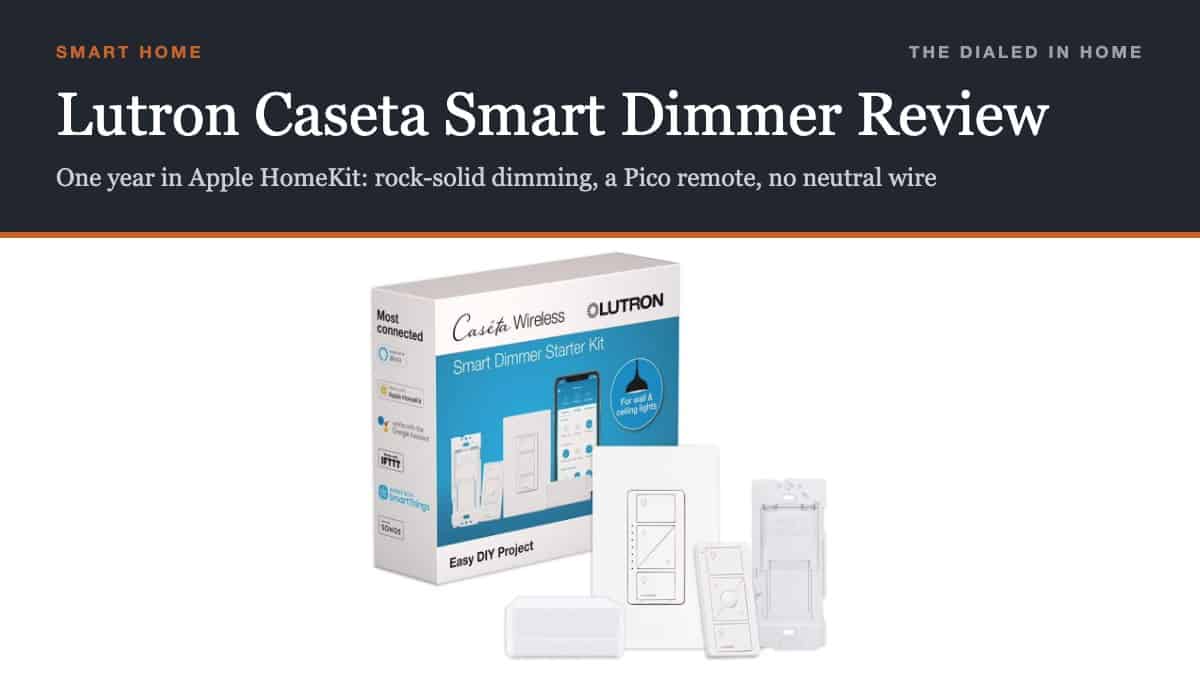
I have been using the Lutron Caseta Smart Dimmer Switch and Remote Kit (P-PKG1W-WH-R) for about a year, and I will say right up front that it has been a great addition to my smart home. I run it in Apple HomeKit through Lutron’s Smart Hub, and it has been one of the most stable devices in my setup. It responds instantly, it doesn’t drop off the network, and I haven’t had to re-pair it once.

Lutron knows dimmers better than anyone. Physicist Joel Spira invented the solid-state wallbox dimmer in 1959, and he and his wife Ruth founded Lutron Electronics in 1961 to sell it. That makes this a company with 65 years of dimming behind it. Its wireless home control systems followed later, starting with RadioRA in the late 1990s and then Caseta, the do-it-yourself line this kit belongs to.
Price and availability
| Product | Model | What’s included | List price |
|---|---|---|---|
| Caseta Smart Dimmer Switch and Remote Kit (reviewed) | P-PKG1W-WH-R | Smart dimmer, Pico remote, wallplate | $74.95 |
| Caseta Smart Hub (required for app, HomeKit, Alexa, Google) | L-BDG2-WH | Smart Hub | $89.95 |
| Caseta Smart Dimmer Starter Kit | P-BDG-PKG1W | Smart dimmer, Pico remote, Smart Hub | $114.95 |
What’s in the box

- Caseta Smart Dimmer (PD-6WCL): the in-wall dimmer with on, off, raise, and lower buttons. It replaces your existing switch.
- Pico remote: a small battery-powered remote with on, off, raise, lower, and a favorite-level button. Keep it on a table or mount it to a wall as a second switch.
- Screwless wallplate: for the dimmer.
What’s not in the box: the Smart Hub, and the wallplate bracket for mounting the Pico in a wall box (PICO-WBX-ADAPT, about $10). Out of the box, the dimmer and Pico work together on their own. You need the hub to control them from your phone, set schedules, or connect to HomeKit, Alexa, Google Home, Ring or Sonos.
Kit or starter kit? Start with the hub
This is the most common buying mistake with Caseta. The P-PKG1W-WH-R kit I’m reviewing does not include the Smart Hub. If you are new to Lutron, buy the Caseta Smart Dimmer Starter Kit (P-BDG-PKG1W) instead. It bundles the same dimmer and Pico with the Smart Hub for $114.95, which is $49.95 less than buying the kit and hub separately at list price.
If you already own a Smart Hub, as I do, the Lutron Caseta Smart Dimmer and remote kit is the right buy. One hub handles up to 75 Caseta devices, so you only buy it once. The hub plugs into your router with an Ethernet cable and talks to the switches over Lutron’s own Clear Connect RF, not your Wi-Fi. That is a big part of why the system is so reliable. It isn’t competing with your laptops, TVs, and cameras for bandwidth.
Installation
With any home electrical work, never remove or install a switch without turning the circuit off at the breaker. Getting shocked is more than painful; it can kill you. If you don’t have the DIY spirit, hire an electrician. If you go that route, plan out every switch and outlet you want to upgrade before they come to the house, then get quotes for one visit that covers it all. Doing it in one trip will save you money.
For a DIYer, the Lutron Caseta Smart Dimmer is one of the easiest smart switches to install, for a few reasons:
- No neutral wire required. Most Wi-Fi smart switches need a neutral wire in the box, and many older homes don’t have one at the switch. The Caseta dimmer is a two-wire design that works without it.
- Wireless 3-way. Want a second switch at the other end of a hallway or the bottom of the stairs? Mount a Pico there. No new wire to pull. One dimmer accepts up to 10 Pico remotes or Lutron sensors.
- Guided setup. Once it’s wired, the Lutron app walks you through adding it to the hub, and from there to Apple Home.
Pico range is up to 60 feet line of sight, or 30 feet through walls. The dimmer is rated for indoor use only.
Bulbs: what works and what doesn’t
This is where most dimmer problems start, so it’s worth getting right before you buy. I had flickering bulbs in my own setup. When I replaced them with bulbs from Lutron’s compatibility list, the problem went away. In my chandelier, I now use the Feit Electric A19 LED, 60W equivalent, 3500K Neutral White, a dimmable 8.8W clear filament bulb.

- LED bulbs must be dimmable. The Lutron Caseta Smart Dimmer handles up to 150 watts of dimmable LED or CFL. Check the package; if it says “non-dimmable” or “not for use with dimmers,” it will flicker, buzz or fail early on this switch.
- Incandescent and halogen work. Old-school incandescent and halogen bulbs are fully supported, up to 600 watts. They actually dim the most smoothly of all. The catch is that most standard incandescent bulbs are no longer sold in the U.S., so most of you will be buying LEDs anyway.
- Mixing bulb types lowers the limit. If one fixture has both LED and incandescent bulbs, the maximum load drops below 600 watts. Keep each circuit to one bulb type.
- Watch the minimum load. The dimmer needs at least 25 watts, or one bulb from Lutron’s compatibility list. A single low-watt decorative LED, like a small Edison-style bulb, can flicker.
- Not for smart bulbs, low-voltage lighting or fans. Don’t put Hue or other smart bulbs behind a dimmer. Lutron says smart bulbs are not dimmable. This model isn’t rated for low-voltage lighting like some track lights, and it isn’t a fan control. Lutron sells a separate Caseta fan speed control for ceiling fans.
Before you buy bulbs, check them against Lutron’s free LED Compatibility Tool. Lutron tests bulbs from the big brands and lists the ones that dim without flicker or hum. If you still see flicker at low levels, the dimmer has adjustable low-end and high-end trim that usually fixes it.
Setting up the Smart Hub and adding it to Apple Home
Setting up the Lutron Caseta Smart Hub and linking it to Apple HomeKit takes about 10 to 15 minutes. It’s easy.
What you’ll need
- Tools: none, unless you’re also installing hardwired switches.
- Lutron Caseta Smart Hub (formerly called the Smart Bridge). HomeKit requires the second-generation L-BDG2 or the Pro L-BDGPRO2.
- The included Ethernet cable and power adapter.
- A router with an open Ethernet (LAN) port.
- An iPhone or iPad on the same home Wi-Fi network.


Step by step

- Connect the hardware. Plug the Ethernet cable into the hub and into an open port on your router, then plug in the hub’s power. If you go through a network switch instead of the router, use an unmanaged switch.
- Get the Lutron app. Download it from the App Store, then create or sign in to your Lutron account.
- Pair the hub. Choose Add New Home and follow the prompts. When the app finds the hub, press the small black button on the back of the hub.
- Let it update. Give the hub a few minutes to download firmware, then name your home.
- Add your devices in the Lutron app first. Go to Add Device, pick the device type, and hold the bottom (off) button on the dimmer for about 10 seconds until its LED blinks rapidly.
- Link to Apple Home. In the Lutron app’s integration settings, choose Apple HomeKit and follow the prompts to add the hub to the Home app. Your dimmers, switches and shades sync over. Pico remotes don’t appear in Apple Home; they keep controlling the devices they’re paired to.
Why HomeKit needs the hub
Apple Home devices talk over Wi-Fi, Bluetooth or Thread. Caseta switches have none of those radios. They use Clear Connect, Lutron’s own radio system, so the hub acts as the translator. It sits on your network, listens for HomeKit commands, and passes them to your switches over Clear Connect. That design has real benefits:
- No Wi-Fi congestion. Adding 20 or 30 switches won’t slow down your home network, because they talk to the hub, not your router.
- Range and speed. Clear Connect runs around 434 MHz, well below crowded 2.4 GHz and 5 GHz Wi-Fi, so signals get through walls and floors with almost no lag.
- Local control. If your internet goes down, your Apple home hub (HomePod or Apple TV) and the Lutron hub still talk over your local network, so automations and Siri keep working.
- Firmware updates. The hub downloads Lutron’s firmware updates through the app, so the system keeps improving after you install it.
Living with it: HomeKit and reliability
After a year, reliability is the reason I’d buy the Lutron Caseta Smart Dimmer again. In Apple Home, the dimmer shows up like a native accessory. I can dim it with Siri, put it in scenes, and run it on automations, and it responds right away every time. It works seamlessly with the rest of my HomeKit setup.
The physical controls matter too. Anyone in the house can walk up and use the switch like a normal dimmer, with no app and no learning curve. The Pico remote is handy enough that I use it more than I expected. And if your internet goes down, the switch and Pico keep working because they talk to each other directly.
Beyond HomeKit, the same hub connects Caseta to Amazon Alexa, Google Home, Ring, SmartThings and Sonos. That breadth is a big reason so many reviewers recommend it. If you’re building out an Apple home, see our guide to Apple’s smart home push and what to buy now.
Is the Lutron Caseta Smart Dimmer one of the best?
Yes. Caseta is the most consistent top pick in smart dimmer roundups. Reviewed names the Caseta dimmer starter kit its Best Overall smart in-wall dimmer, and separately its best smart dimmer for Apple HomeKit. Popular Science calls the Caseta dimmer and Pico kit the best smart light switch overall, and SafeWise also ranks Caseta its best overall smart switch. The reasons repeat across reviews: no neutral wire, the Pico remote, wide platform support, and reliability from its own radio network instead of Wi-Fi.
The common complaints are fair and worth knowing:
- The hub is required for anything beyond the switch and Pico, and it adds $89.95 if you don’t buy a starter kit.
- It costs more than Wi-Fi dimmers from Kasa or Leviton, especially if you’re only doing one switch.
- It isn’t Matter. The Caseta Smart Hub connects to the major platforms through its own integrations, not the Matter standard. For HomeKit users that hasn’t mattered in practice, but buyers building around Matter should know.
- The look is distinctive. The button design is a love-it-or-not style. If you want a traditional paddle, look at the Diva Smart Dimmer below.
Other Caseta options
Once you have the hub, every Caseta device works together, so you can mix styles room by room.
Lutron Diva Smart Dimmer (DVRF-6L): from $69.95
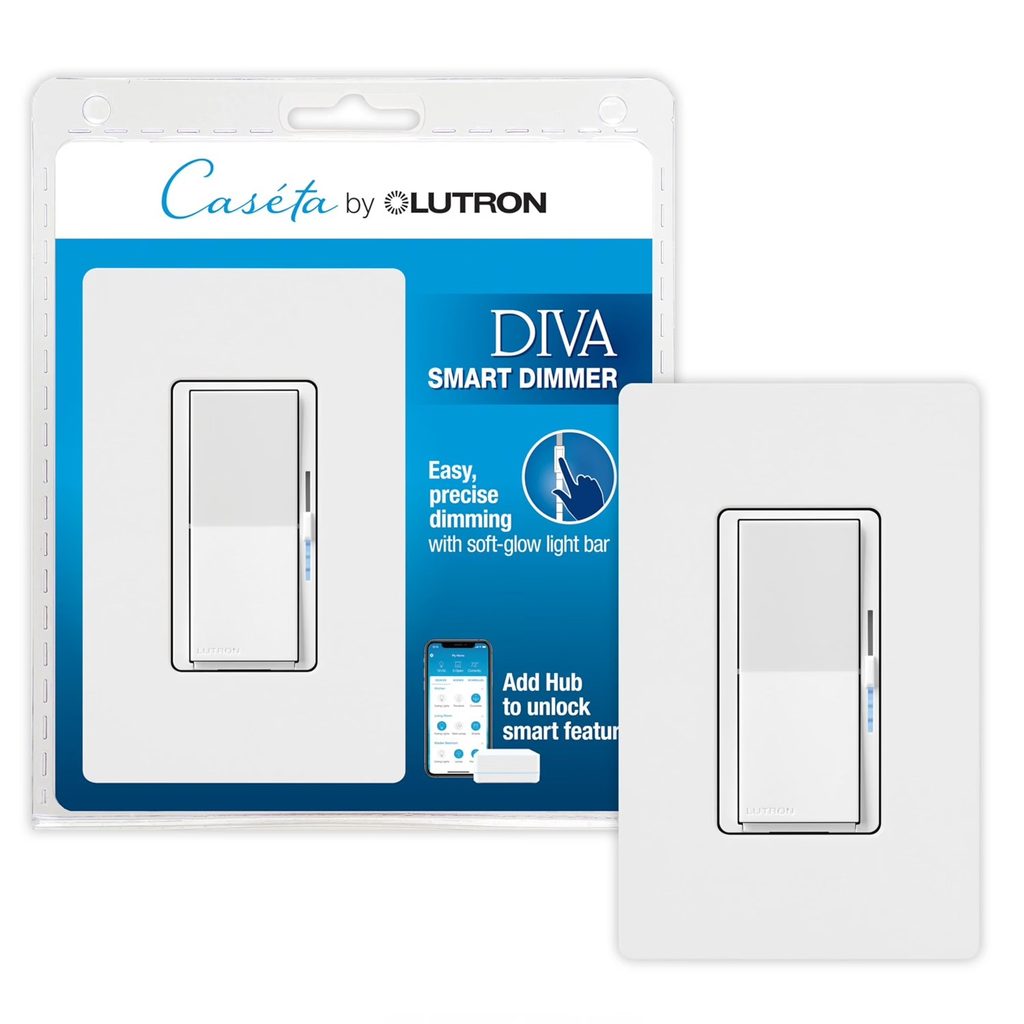
Same Caseta system, same 150W LED and 600W incandescent ratings, same no-neutral install, but in Lutron’s classic Diva paddle-and-slider design. It’s the pick if you want smart dimming that looks like a regular switch. It’s also sold as a starter kit with the hub and a Pico (DVRF-BDG-1D, $124.95 list).
Lutron Claro Smart Switch (DVRF-5NS): $59.95
An on/off Caseta switch for lights you don’t need to dim, plus non-dimmable LEDs and fans up to 3 amps. Unlike the dimmer, it requires a neutral wire.
Lutron Caseta Smart Outdoor Plug and Remote (P-PKG1OUT-BL): $109.95
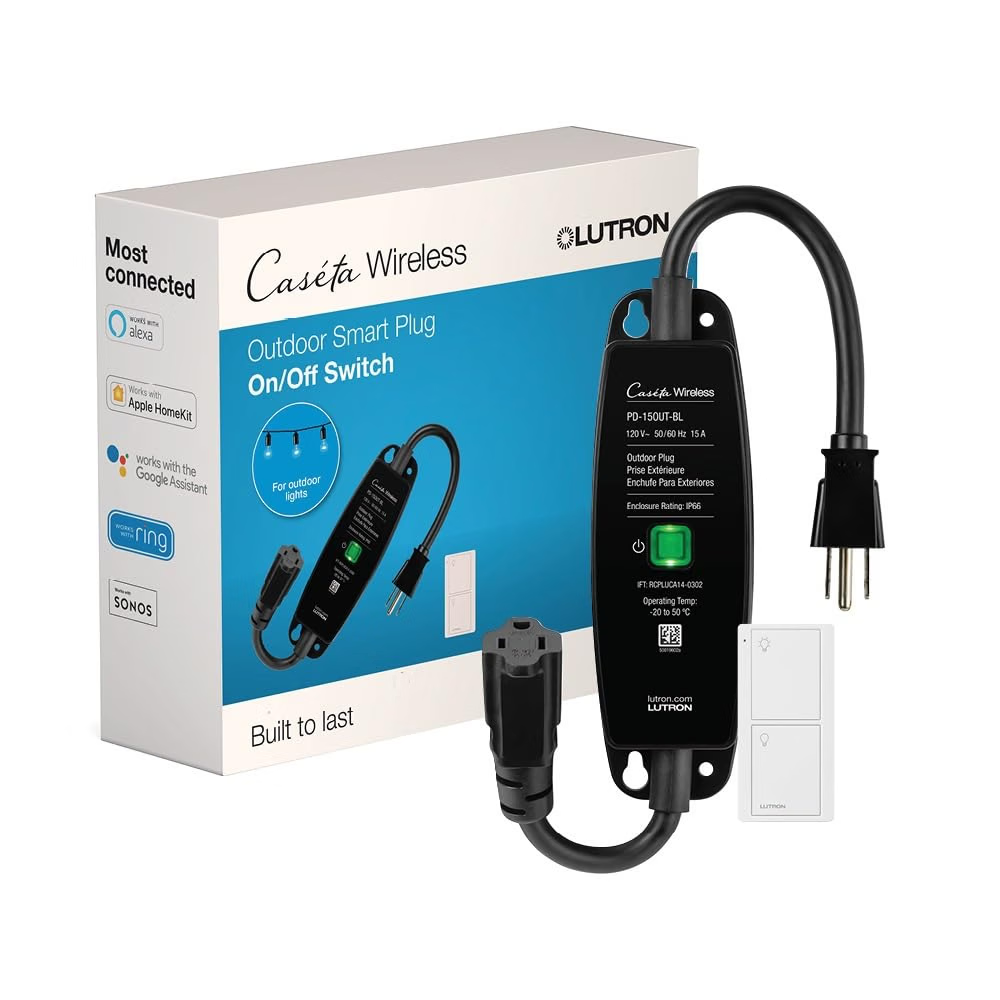
This is the next Caseta device going into my house, for the outdoor Christmas lights. I’ve wanted a HomeKit-compatible outdoor smart plug for a while, and this is the year. It’s a weatherproof on/off plug that handles up to 15 amps of LED lighting or a 1/2-horsepower motor, so it covers string lights, landscape lighting and inflatables. I like that it includes a two-button Pico remote, so you can switch the lights without reaching for your phone. Like the dimmer, it needs the Smart Hub for app, HomeKit and schedule control, and Lutron recommends placing it within 30 feet of the hub. The plug is also sold alone (PD-15OUT-BL) for $84.95.
Lutron Caseta Smart Hub (L-BDG2-WH): $89.95
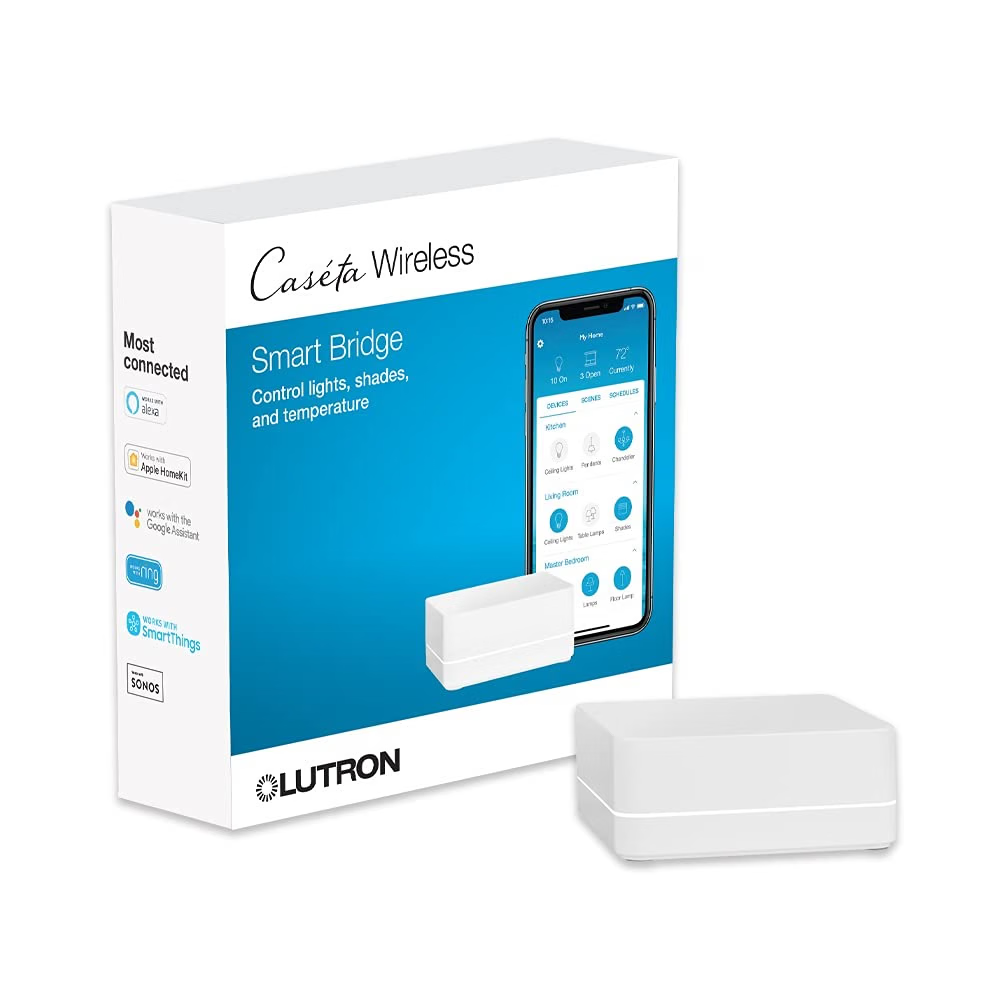
If you buy the dimmer kit on its own, you’ll need this to use the app, HomeKit or voice control. Up to 75 Caseta devices per hub.
Smart dimmers from other brands
Leviton Decora Smart Wi-Fi Dimmer, 2nd Gen (D26HD-1RW): about $40
The strongest no-hub alternative. It connects over Wi-Fi, works with Matter, Apple Home, Alexa and Google, and supports wired or wire-free 3-way setups with Leviton companions. The trade-off: it needs a neutral wire, and it adds another device to your Wi-Fi network.
Kasa Matter Smart Dimmer Switch (KS225): under $25
The budget pick. Matter-certified over 2.4GHz Wi-Fi, so it works with Apple Home, Alexa and Google without a hub, and it includes a wallplate. It needs a neutral wire and is single-pole only, so it isn’t a fit for 3-way locations.
Inovelli White Series Smart Dimmer (Matter over Thread): about $65
For enthusiasts. It runs Matter over Thread, works without a neutral wire, and adds a full-color LED notification bar and multi-tap scene control. It needs a Thread border router, which most HomeKit homes already have in an Apple TV or HomePod mini. Amazon availability is spotty; Inovelli sells it direct.
What to look for in a smart dimmer
- Check for a neutral wire. Open the switch box with the power off. If there’s no bundle of white wires, your choices narrow to no-neutral designs like Caseta, Diva or Inovelli.
- Pick your connection: hub, Wi-Fi or Thread. A dedicated radio like Caseta’s Clear Connect is the most reliable. Wi-Fi is cheapest to start but adds traffic to your router. Matter over Thread is the newer standard and needs a border router.
- Match your ecosystem. Confirm it works with what you already use, whether that’s Apple Home, Alexa, Google Home or something else.
- Know your circuit. Single-pole (one switch) or 3-way (two switches for one light)? Caseta handles 3-way with a Pico and no rewiring.
- Add up the load and check the bulbs. Total the bulb wattage and stay under the dimmer’s rating, use dimmable LEDs, and confirm them on the manufacturer’s compatibility list.
- Think whole-house cost. A hub system costs more for the first switch and less per switch after that. If you plan to do several rooms, a starter kit plus individual dimmers usually wins.
The bottom line
The Lutron Caseta Smart Dimmer Switch and Remote Kit is still the smart dimmer to beat. It installs without a neutral wire, it gives you a wireless 3-way switch in the box, and after a year in my HomeKit setup it has been rock solid. Just buy the right bundle: if you don’t own a Caseta Smart Hub yet, get the starter kit. Use dimmable LEDs, check them against Lutron’s compatibility list, and this is a switch you install once and stop thinking about.
Specifications
Lutron Caseta Smart Dimmer (PD-6WCL, included in P-PKG1W-WH-R)
| Voltage | 120V AC |
| Dimmable LED / CFL | Up to 150W |
| Incandescent / halogen | Up to 600W |
| Minimum load | 25W or one bulb from Lutron’s compatible list |
| Neutral wire | Not required |
| Wiring | Single-pole; multi-location (3-way) with Pico remotes |
| Wireless | Lutron Clear Connect RF (not Wi-Fi) |
| Pico range | 60 ft line of sight, 30 ft through walls |
| Remotes / sensors per dimmer | Up to 10 |
| Operating temperature | 32 to 104°F (0 to 40°C), indoor only |
| Low-end / high-end trim | Adjustable |
| Kit contents | Smart dimmer, Pico remote, screwless wallplate |
| Colors | White (kit) |
| List price | $74.95 (kit); $64.95 (dimmer only) |
Lutron Caseta Smart Hub (L-BDG2-WH)
| Device capacity | Up to 75 Caseta devices |
| Connection | Ethernet to router; plug-in power |
| Works with | Apple Home, Amazon Alexa, Google Home, Ring, SmartThings, Sonos |
| Matter | No |
| List price | $89.95 |
Lutron Caseta Smart Outdoor Plug and Remote (P-PKG1OUT-BL)
| Voltage | 120V |
| Load | Up to 15A LED fixtures or 1/2 HP motors |
| Control | On/off |
| Weather rating | Weatherproof+ (outdoor rated) |
| Placement | Within 30 ft of the Smart Hub recommended |
| Kit contents | Outdoor Smart Plug, two-button Pico remote |
| Hub | Required for app, HomeKit and schedules (sold separately) |
| List price | $109.95 (kit); $84.95 (plug only) |
Alternatives at a glance
| Model | Connection | Neutral required | 3-way | Price |
|---|---|---|---|---|
| Lutron Caseta Smart Dimmer kit | Clear Connect (hub) | No | Yes, with Pico | $74.95 |
| Lutron Diva Smart Dimmer | Clear Connect (hub) | No | Yes, with Pico | From $69.95 |
| Lutron Claro Smart Switch (on/off) | Clear Connect (hub) | Yes | Yes, with Pico | $59.95 |
| Leviton Decora Smart D26HD | Wi-Fi, Matter | Yes | Yes, with companions | About $40 |
| Kasa KS225 | Wi-Fi, Matter | Yes | No | Under $25 |
| Inovelli White Series Dimmer | Thread, Matter | No | Yes | About $65 |
